Scratch project ideas for kids, by age: from a talking matatu to a platform game
Your child opens Scratch, drags the cat around the screen, and stalls. A project pitched at the right age, with one new skill inside it, keeps them building.

, 5 min read
On this page
Sit beside a child the first time they open Scratch. The cat appears. They make it move ten steps, then spin, then say “Hello!”. They laugh. Ten minutes later they’re clicking through the costume menu with no plan, and by the next weekend the laptop stays shut.
The child didn’t lose interest in coding. They ran out of ideas, and nobody gave them a project which asked a bit more of them than the last one.
“Copying a tutorial teaches my child to code”
Tutorials are a fine start. Scratch’s own site has dozens, and a child who follows one ends up with a working game in an afternoon.
Then ask your child to change the game. Make the player faster. Add a second level. Many children freeze, because following steps and making decisions are different skills. A tutorial teaches the first. A project your child changes, breaks and fixes teaches the second.
A tutorial gives your child someone else’s game. Changing it is where the game becomes theirs.
One rule applies to every idea below: after the tutorial or the first version, change three things nobody asked for. A new sprite, a new sound, a new rule. Those three changes are where the learning happens.
The age ladder
The Scratch Foundation pitches ScratchJr at ages five to seven and Scratch at eight and up. Within Scratch, the skills stack in a rough order: movement and speech first, then scores, then copies of sprites and lists.
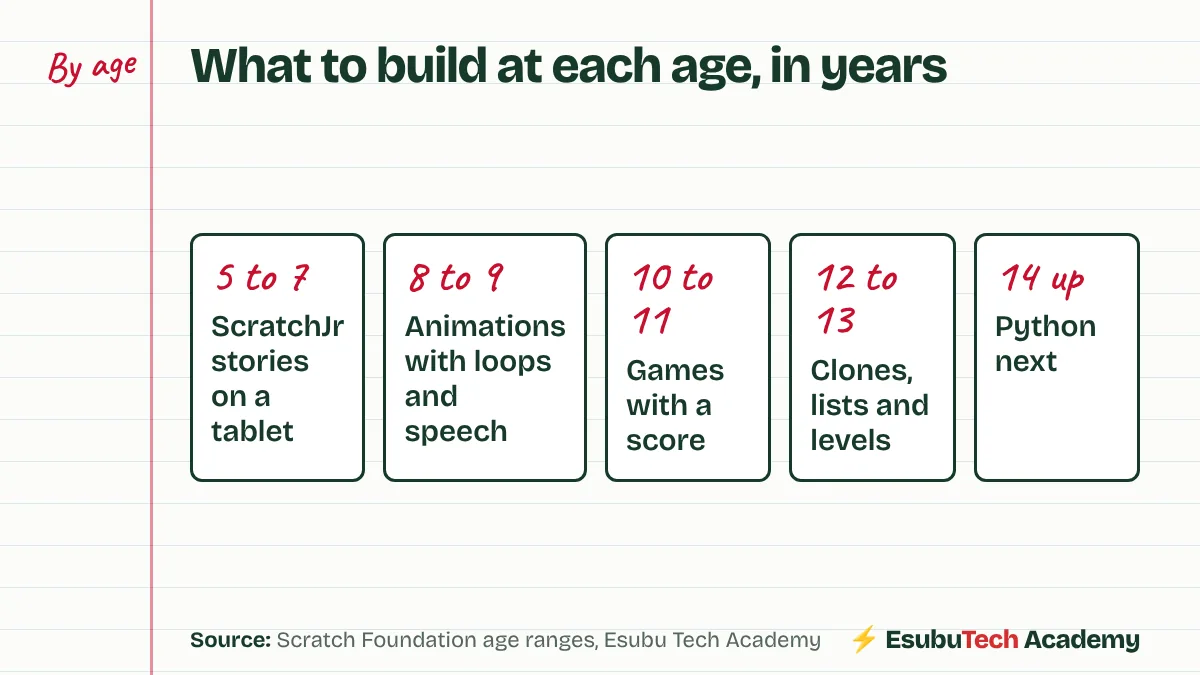
Age is a starting guess. A careful nine-year-old with a year of Scratch behind them belongs further up. A twelve-year-old opening Scratch for the first time starts at the beginning, and moves fast.
Ages 5 to 7: ScratchJr
1. The cow goes to the river. A cow walks across a farm, stops at the river and drinks. Your child learns to join movement blocks in order, the idea every program rests on.
2. A two-page story. On page one, a hen meets a goat and they greet each other. On page two, they go to the market. Your child learns pages, speech and timing.
Ages 8 to 9: animations and stories
3. Animate your name. Each letter of your child’s name is a sprite. Clicking a letter makes it spin, change colour or play a sound. One idea, repeated with small changes, teaches events and loops.
4. The talking matatu. A matatu drives across a Nairobi backdrop, stops at a stage, and the conductor calls out the route. Your child learns glide blocks, waits, speech bubbles and broadcasts, the message one sprite sends to another.
Ages 10 to 11: games with a score
5. Catch the mandazi. Mandazi fall from the top of the screen. A basket slides left and right with the arrow keys. Each catch adds a point. Here is the falling mandazi’s script:
Your child will spot the gap within a minute: a mandazi which hits the floor never comes back. Fixing it with a second “if” block is the lesson.
6. A Kiswahili vocabulary quiz. The sprite asks “What is ‘book’ in Kiswahili?” and waits for an answer. Right answers add to the score, wrong ones show the correct word. Your child learns the ask block, if and else, and keeping score.
7. The maze. A sprite moves with the arrow keys through a maze your child draws. Touching a wall’s colour sends it back. Drawing the maze is half the fun, and testing it teaches patience.
Ages 12 to 13: bigger games
8. A kikoy pattern machine. With the pen extension, a loop draws coloured stripes across the screen, then repeats them with a new width each time. Your child learns nested loops and sees maths turn into a pattern.
9. A platform game. A character runs and jumps between platforms, pulled down by gravity. Your child builds gravity with a variable for speed, the same idea game engines use.
10. Times-table trainer with a high-score list. Ten quick questions against the clock, and the best scores saved in a list. Your child learns lists, timers and keeping the best scores in order.
How to tell a project is finished
Children start ten projects and finish one. A finished project passes one test: someone else plays it without your child standing beside them to explain.
Ask for a title screen with instructions, a way to win or lose, and an ending. Then hand it to a cousin, a grandparent or a sibling, and watch without helping. Every question they ask is a fix for the next version.
Look at the curriculum yourself
Harvard’s Creative Computing Curriculum gives seven units of Scratch activities, free to download and adapt. Scratch’s own ideas page has the tutorials. Read through one unit before you choose for your child.
For what a child’s first month of coding looks like week by week, read the first four weeks of coding. Once the projects above feel easy, what comes after Scratch covers the move to typed code.
Check this yourself
The sources behind this post. Read them, and read the people who disagree, before you decide.
- Scratch tools and age ranges (Scratch Foundation)ScratchJr for ages 5 to 7. Scratch for ages 8 and up.
- Scratch, information for parents (MIT)Free, in the browser, designed for ages 8 to 16.
- Creative Computing Curriculum (Harvard Graduate School of Education)Seven units of Scratch activities, free to download and adapt.
- Scratch ideas and tutorials (MIT)Step-by-step tutorials from the Scratch team.
Sammy founded Esubu Tech Academy and designs its coding and chess curriculum. He holds a BSc in Data Science from KCA University and is studying for an MSc in Artificial Intelligence at the Open University of Kenya. He learned to code as an adult, after years of unfinished tutorials, and teaches children so they start sooner.